
December 2025
Product Updates
-
Ad Account Dashboard & Portal Navigation
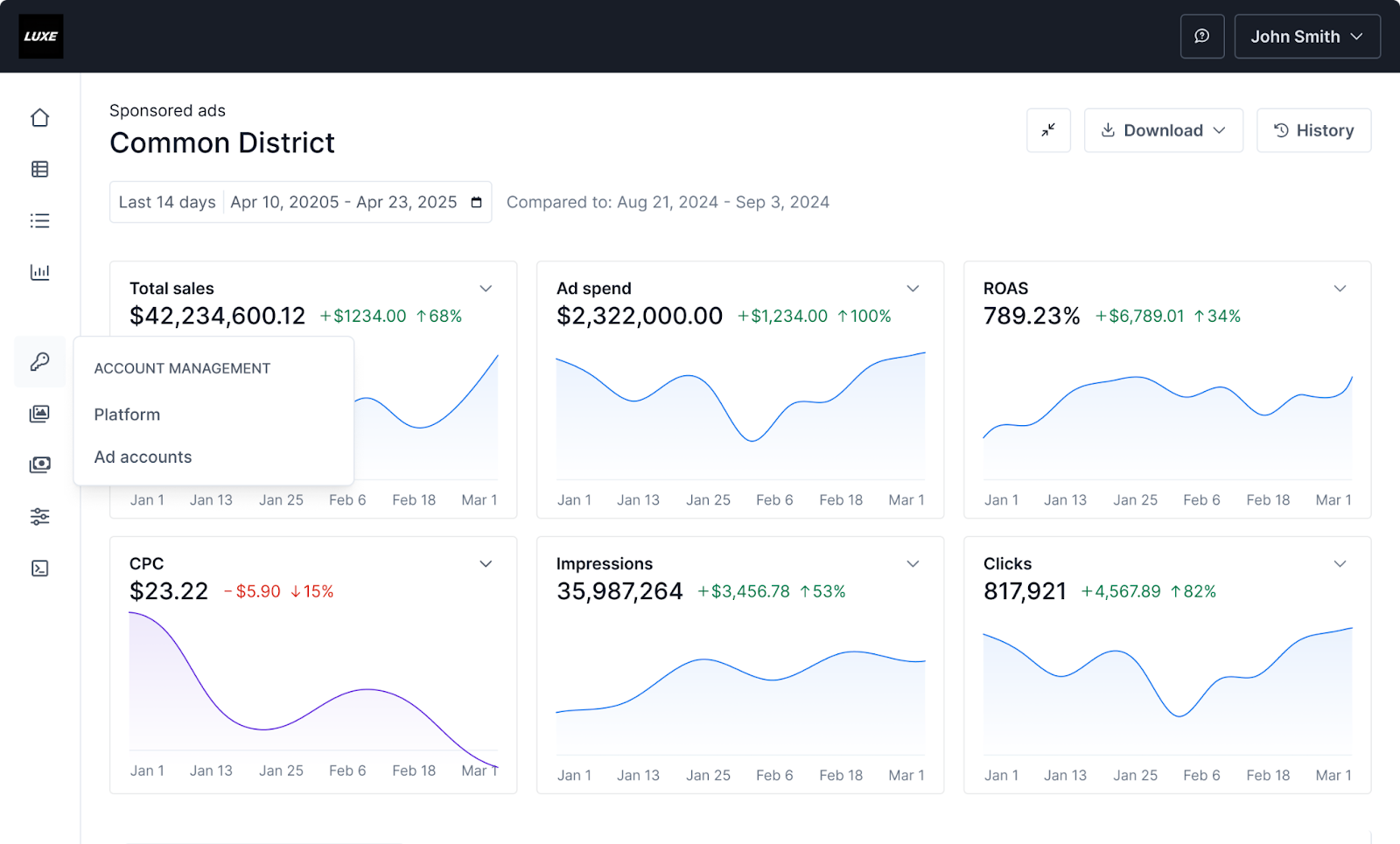
We have redesigned the portal interface to improve daily workflow efficiency and data visibility.
- Grid-View Analytics: The Ad Account Home now displays key performance indicators (KPIs) in a grid of individual charts rather than a single trend table. This allows for easier tracking of multiple metrics at once, with the ability to collapse charts to streamline your view.
- Enhanced Navigation: A new left-hand navigation bar provides quick access to all portal pages and supports custom shortcuts.
- Sticky Headers: Page-level Calls to Action (CTAs) remain visible at the top of the screen even when scrolling through long setup pages.
-
Multi-Factor Authentication (MFA) for Standalone Campaign Manager
To strengthen account security, the Standalone Campaign Manager now supports Time-Based One-Time Password (TOTP) authentication.
- Flexible Configuration: Platform Owners can set MFA requirements at the global level: Disabled, Optional (per user), or Enforced (for all users).
- Easy Enrollment: Users can self-enroll using standard authenticator apps like Google Authenticator or Authy.
- Recovery Options: Includes support for recovery codes and admin management tools to ensure secure access without disrupting the user experience.
-
Extended Role Support for Widgetized Campaign Manager
We have expanded user role support to allow more users to work directly within the Widgetized Campaign Manager, eliminating the need to switch context to the standalone version.
- New Supported Roles: Now supports Ad Manager Account Owner, Ad Manager Account User, and Ad Account Agency roles.
- Seamless Management: Users with these roles can now create and manage campaigns directly within the Platform’s existing advertising or seller portal.
- Role-Specific Navigation: The interface automatically adjusts navigation based on the user's role to support appropriate account management tasks.
-
Item Selection UX Enhancements: GTIN + Advanced Filters
We have streamlined the item selection workflow with two major upgrades designed to help advertisers find and curate products more effectively.
- GTIN Support: Advertisers can now search, upload, and report using Global Trade Item Numbers (e.g., EAN, UPC) rather than relying solely on internal platform IDs.
- Advanced Filtering: Manual item selection now supports structured filtering by Brand, Category, and On-sale status, making it easier to curate precise item sets.
-
Spend Cap
"Spend Cap" is a new billing entity designed to give advertisers granular control over budgets within a single ad account.
- Multiple Budgets: Create up to 100 active or scheduled Spend Caps per ad account to manage specific allocations (e.g., Promotions, IOs, Seasonal Budgets).
- Automated Enforcement: Hard cap enforcement is enabled by default. Campaigns mapped to a Spend Cap will automatically pause when the cap is depleted, the schedule ends, or an error occurs.
- Configuration: Each cap can be customized with a specific title, schedule, spend limit, and ad payer information.