
Platform onboarding
Moloco arranges discovery meetings for business and technology stakeholders to determine the following details for your ad business operations.
Strategy
- Key Business Metrics: Revenue Goal, ROAS target, and target number of advertisers
- Ad Policy: Attribution window, Pricing models (CPC, CPM), Bid price range, Auction type (First-price vs. Second-price), Budget type, Budget range, Invalid ad handling policy, Impression definition, and Overspending control.
Ad inventory placement
Setting inventory dimensions
Each ad inventory can carry a standardized set of dimensions — Page Type, Layout, OS, Channel, Country, and Sub-platform — that describe where and in what context it appears. These are descriptive fields on the inventory configuration and require no SDK, tracker, or ad-request change. For the full list of values, see Inventory Dimensions.
NotePage Type vs the Location field. The Location field above sets the ad inventory type for targeting and setup. Page Type is a separate descriptive dimension used for standardization and reporting; setting it does not change targeting.
Set every dimension at creation. If a value is unknown, use the default (UNKNOWN for Page Type and Layout; ALL for OS, Channel, Country; ALL for Sub-platform) rather than leaving it blank.
Dimensions are immutable. All dimensions are identity-defining and cannot be changed after the inventory is created. If a value needs to change, create a new inventory. The inventory ID also cannot be changed after creation.
Inventory ID naming convention (recommended)
As a readability aid, encode the most identifying dimensions in the inventory ID, joined by underscores, in this order:
{SUBPLATFORM}_{PAGE_TYPE}_{COUNTRY}_{CHANNEL}_{OS}_{LAYOUT}Example:
EM_HOME_KR_APP_ANDROID_CAROUSELGuidelines:
- Omit a broad dimension instead of writing
ALL(the configuration still recordsALL), soEM_HOME_APP_CAROUSELis a valid ID for an inventory spanning all countries and OSes. - The separator is
_; values must not contain_(use merged forms such asINGRID,ORDERCOMPLETE). - Use short forms where natural (for example, ISO country codes), keep the ID at or below 64 characters, and use only letters, numbers, and underscores.
The ID convention is never the source of truth — the configuration fields are.
To configure inventory dimensions for your platform, work with your Moloco Customer Engineering team.
Operations
- Billing: Payment Method (Prepaid vs. Postpaid)
- Campaign ending policy: No end date by default vs. Advertiser-given end date by default
- Campaign termination condition
- Campaign reactivation condition
- Prepaid wallet management: minimum balance and maximum balance
- Postpaid spend control: spend limit, spend limit reset period (monthly vs. bi-weekly)
- Campaign Management system building: Stand Alone, Widgetized, vs. In-hour development using MCM Management APIs.
In addition, you need to confirm the following information for your ad inventories.
- Name: The name for the ad inventory.
- Inventory ID: The unique ID of the ad inventory. This ID can't be updated after it has been created.
- Location: This is the ad inventory type. Available options are the home page, product detail page (PDP), search result page (SRP), and category page.
Onboarding timeline
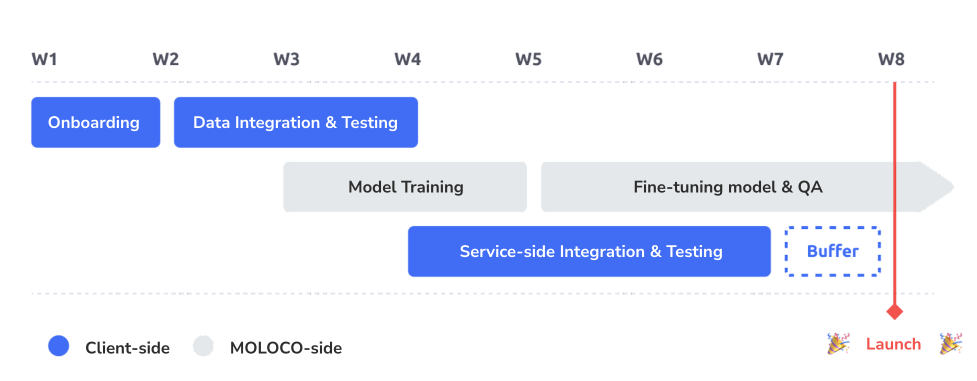
| Title | Time to Prepare | Notes |
|---|---|---|
| Onboarding begins | 1 ~ 2week | |
| Data integration & Synchronization | 2~3 weeks | |
| Service-side integration & Testing | 4~8 weeks | Timeline may vary depending on the available engineering resources |
| Initial Model Development & QA | 2~3 weeks | Official launch is ready! |
| Model Fine-tuning & Live Performance QA | 2 weeks |
Updated 2 months ago