
Custom Targeting
Overview
Custom Targeting lets you define your own key-value pairs and use them as targeting conditions, so that ads are only served when they match the conditions in an ad request. This gives you the flexibility to align ad delivery with your platform's specific business attributes, such as region, language, product style, or license.
You define the keys and values that reflect your business, and advertisers select from those values when setting up campaigns or line items. When an ad request includes a key-value condition, only ads that match the requested condition are eligible to serve.
- Key: the name of a targeting attribute, such as Location, Language, Style, or License.
- Value: a selectable option under a key, such as France, English or Men.
This model lets you incorporate your own business attributes directly into ad targeting, supporting use cases such as region-specific promotions, language-matched banners, gender or age based merchandising, and license-controlled campaigns.
When to use Custom Targeting
Custom Targeting is useful when ads need to match conditions that are specific to your platform and are not already covered by standard targeting features. Common examples include:
| Use Case | Key | Values | Purpose |
|---|---|---|---|
| Fashion platform | Styles | Men, Women, Boys, Girls | Style-based advertising by gender and age |
| Multi-Region Platform | Location | France, Spain, UK, USA | Region-specific promotion exposure |
| Multilingual Platform | Language | English, Korean, French | Banner matching based on user language |
| License | License | «Licensed Brand A», «Brand A», «Partner A» | Separate creatives by brand license |
Custom Targeting is especially valuable for display ad types, which historically lacked a way to receive a condition parameter in the ad request and respond with matching display ads.
Supported ad types
Custom Targeting is available across the following ad types:
- Reserved Display (Guaranteed Impression)
- Sponsored Products
- Sponsored Brands
- Sponsored Display
The campaign setup experience may look different between Reserved Display and Sponsored Ads, but the underlying capability is the same. Some behaviors differ by ad type and are flagged throughout this document, most notably reporting.
Sponsored Ads Note:Custom Targeting is supported on the DecideAdProducts, DecideAdBrands, and DecideAdDisplay decision APIs, and on DecideAdReservedDisplay for Reserved Display. Custom Targeting is not supported on the DecideAdItems API. If you currently use DecideAdItems and want to use Custom Targeting, you need to migrate to the DecideAdProducts API.
Key concepts
Keys and values
You create keys and add values under each key. Each key requires at least one value. Keys and values each have an immutable ID and a mutable label.
- IDs are permanent once created and identify the key or value to the system.
- Labels can be updated at any time. Label changes are reflected in the campaign setup experience and in reports.
Key and value IDs are case insensitive. IDs are normalized to lowercase, so an ID entered as test-iPad is stored and matched as test-ipad.
Single-select and multi-select
Each key can be configured as single-select or multi-select:
- A single-select key can later be changed to multi-select.
- A multi-select key cannot be changed back to single-select. To move from multi-select to single-select, you need to create a new key; previous campaign inputs are removed and advertisers must provide new inputs on the new key.
Optional and required keys
Each key can be configured as optional or required for a given ad type:
- If a key is optional, advertisers can leave it unconfigured during campaign or line item setup.
- If a key is required, advertisers must select at least one value to proceed.
Ad-serving activation
A key only influences ad matching when it is set to ad-serving active. This lets you separate two flows:
- Setup flow: advertisers can begin adding inputs for a new key as soon as it is available.
- Decision flow: the key starts affecting ad matching only once you activate it for ad serving, for example after enough campaigns have provided inputs.
If a key is not active for ad serving, it is ignored during matching even when it appears in the ad request.
How matching works
Custom Targeting functions as a set of conditions, not as a bidding object. Advertisers cannot place individual bids on custom target values the way they can with keywords.
Matching follows the same logic as other targeting features:
- Across keys (AND): matching only considers the keys that are included in the ad request. For those keys, AND logic applies, so each requested key must match for the ad to be eligible. The decision honors the request: if a campaign is configured with both Device and Geo, but the request only asks for Device, only the Device condition is used as the match criteria.
- Across values within a key (OR): if a key allows multiple values, each selected value is matched independently. Selecting multiple values does not combine them into a single condition.
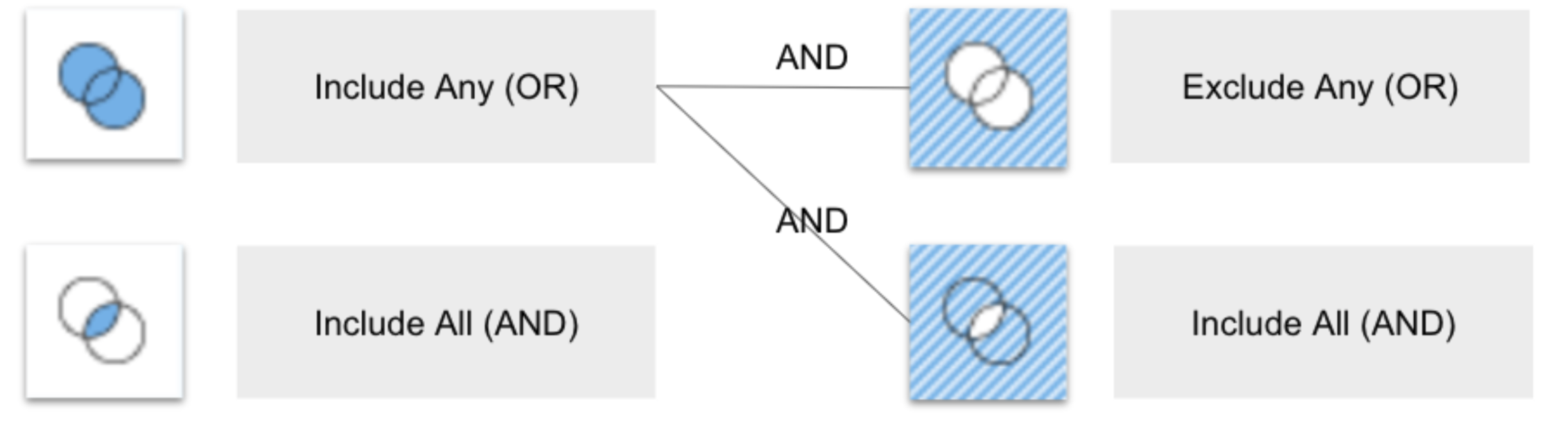
In this release, Custom Targeting uses post-filtering, meaning the matching condition is applied later in the ad decisioning process rather than during retrieval.
Setting up Custom Targeting (handled by MCM CE team)
At a high level, enabling Custom Targeting involves:
- Create keys and values that represent your business attributes. Values can be added individually or in bulk.
- Configure each ad type with the keys it should offer. The same key can be reused across multiple ad types (for example, a Device key can be offered on both Reserved Display and Sponsored Display).
- Set each key's options, including single-select or multi-select, optional or required, and which values are visible to advertisers.
- Activate the key for ad serving when you are ready for it to affect ad matching.
A key must have at least one value to be usable, and each key offered on an ad type must have at least one visible value.
Value visibility
You can show or hide individual values from the campaign setup experience. Hidden values are not selectable by advertisers, but values that previously received activity still appear in reports.
Advertiser experience
When a key is configured for an ad type, advertisers see it in the targeting section of the campaign or line item setup (shown as serving conditions for the one-page campaign form in Sponsored Ads).
- For a required key, advertisers must select a valid value to proceed.
- For an optional key, advertisers can skip it. When skipped, the key does not constrain serving for that campaign.
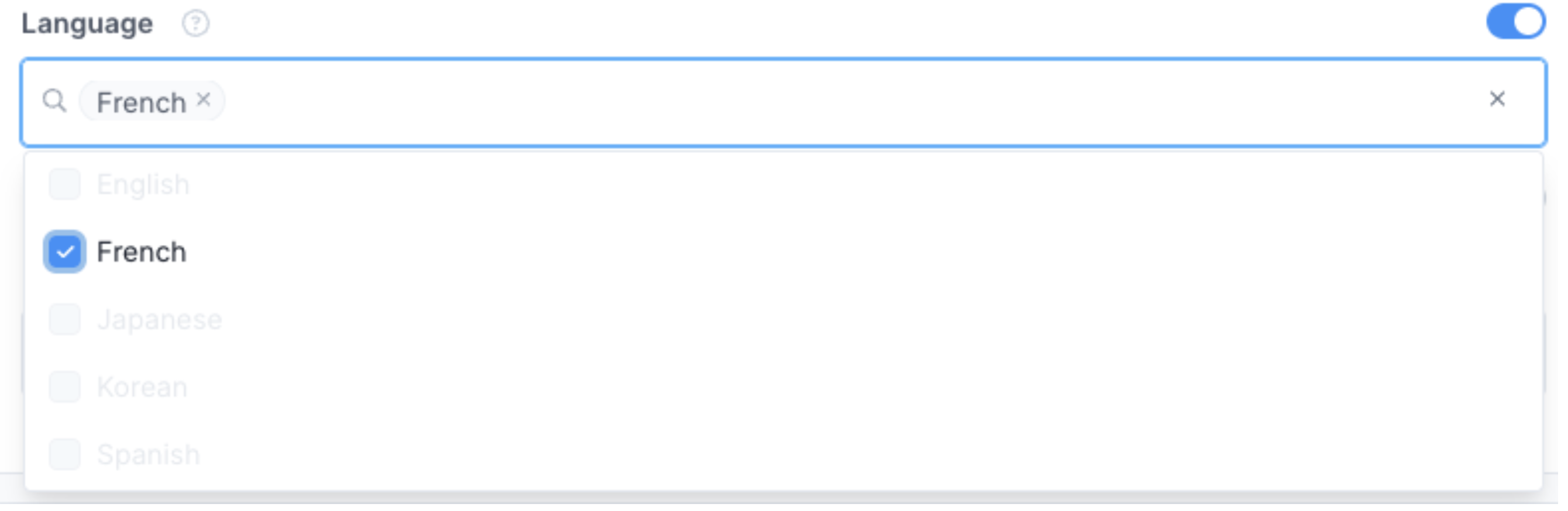
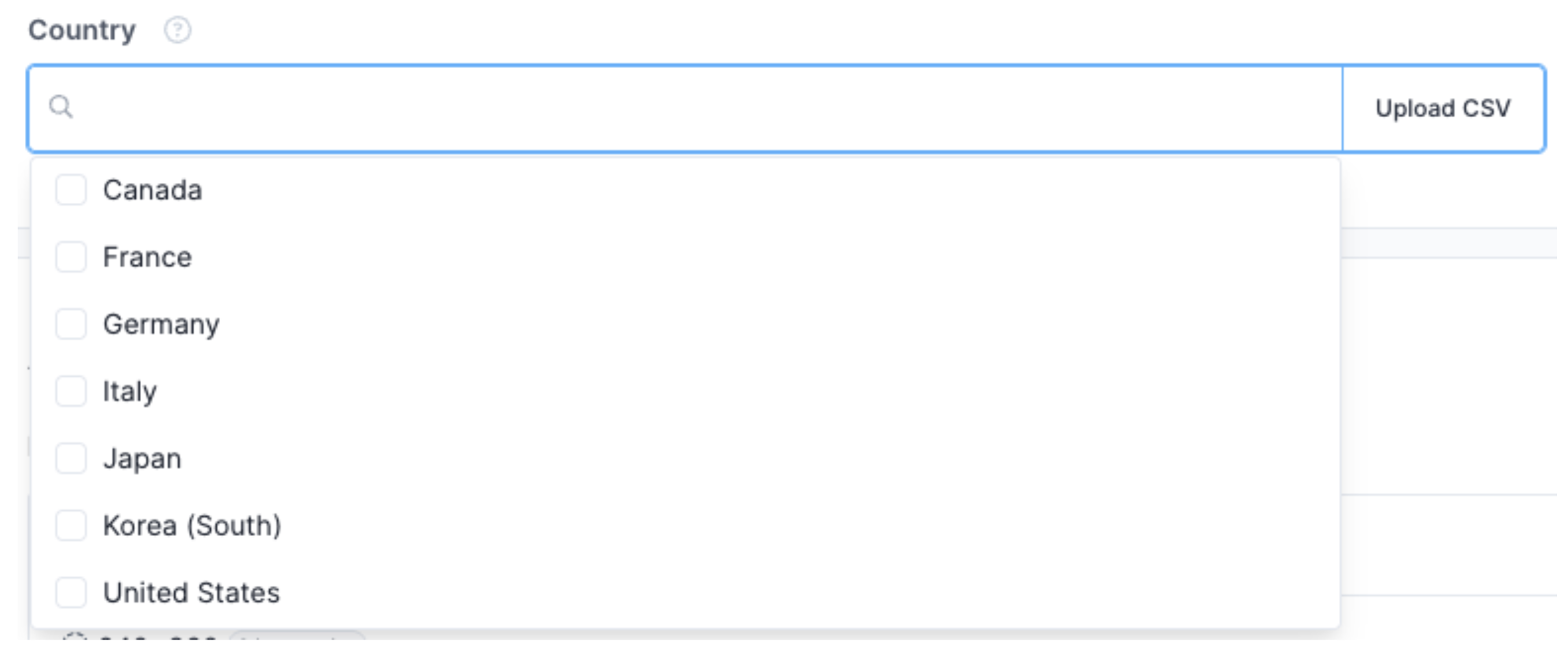
- For a single-select key, advertisers select one value; for a multi-select key, they can select multiple.
Key = ‘Language’ / optional input / single select
Key = ‘Country’ / required input / multi-select
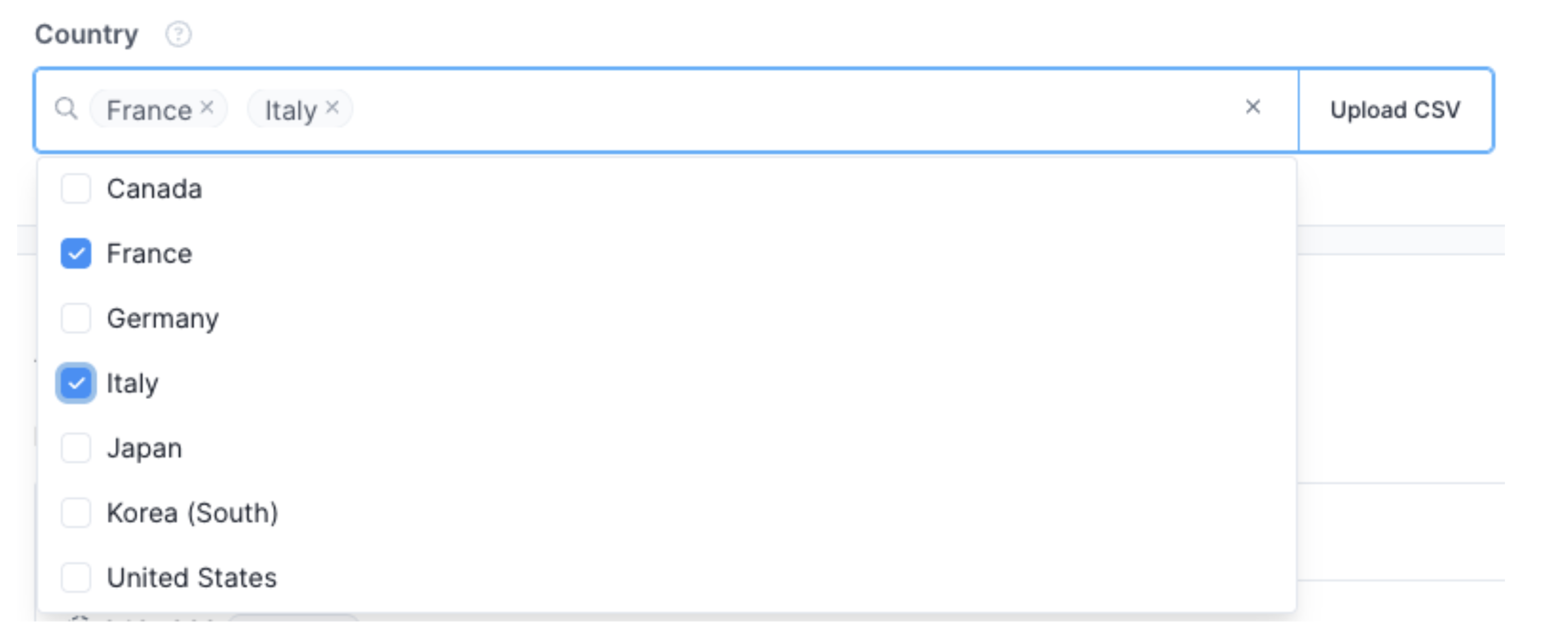
Custom target selections appear in campaign confirmation and campaign history in the same format as other targeting features, for example "[Key] Targets - [value_1, value_2, …]".
Notifications for new required inputs
If you add a new required key, or change a key from optional to required, affected advertisers are notified that a new input is needed. Active campaigns continue to serve and are not interrupted, even if they are missing the newly required input.
Reporting
Reporting behavior differs by ad type.
- Reserved Display: a custom key level report is available for download at the line item level for any key that was configured within the last 60 days.
- Sponsored Ads: in-portal reporting for Custom Targeting on Sponsored Ads is not available.
When an ad request includes multiple values that match a campaign, all matching values are logged. As a result, impressions and clicks can be counted under more than one value. For example, if a request includes Styles [Men, Boy, Girl] and a campaign targets [Men, Boy], the report records an impression and click under both Men and Boy, while Girl shows zero.
Performance data is not shown when there are no metrics for a given target. Even if a target is configured, no data is produced when impressions are zero.
Localization
Custom Targeting does not maintain translated versions of keys and values. Because keys and values are custom and can be dynamic, localization is out of scope.
- If you need keys or values in a local language, you can create the labels directly in that language. The system operates on the underlying IDs.
- If you need to represent multiple languages, you can format a single label to cover them, for example [English] / [Spanish] / [French]. The system still operates on the IDs.
Decision API behavior
Custom targeting conditions are passed in the ad request and returned ads are guaranteed to satisfy the valid key-value conditions.
Request
- For each inventory, key-value sets are provided under the
targeting.key_values field. - Each inventory supports up to 5 keys.
- Each key supports up to 100 values per inventory.
- Requests that exceed the key or value limits are rejected with a 400 error.
- If a provided key is not active for ad serving, it is ignored by the matching algorithm.
Response and warnings
If there are non-fatal input errors in the key-value sets, ad serving proceeds while ignoring the problematic inputs, and the response includes warning messages so you can detect and correct them. Example warnings include:
- key-value targeting not configured for platform
- key-value targeting key not applied: keys must be unique per inventory
- key-value targeting key not applied: key not found in platform config
- key-value targeting key not applied: key not active
- key-value targeting value not applied: value not found in platform config
When a key is applied
For a key to be used in matching, all of the following must be true:
- The key and its values exist in your platform configuration.
- The key is set to ad-serving active.
- The key ID is included in the ad request, and is not duplicated for the same inventory.
For a value to be used, it must exist under the key in your platform configuration. If any of these conditions are not met, the key or value is ignored during serving even if it appears in the request, and a warning is returned.
Limits
| Limit | Value |
|---|---|
| Maximum length of a value ID and label | 50 characters each |
| Maximum length of a key ID and label | 50 characters each |
| Maximum values per key | 100,000 |
| Maximum values an advertiser can target per key, per campaign | 1,000 |
| Maximum keys per ad type | 5 |
| Maximum keys included per inventory in an ad request | 5 |
| Maximum values per key, per inventory in an ad request | 100 |
Limitations and important notes
- Custom Targeting is a simple key-value condition feature. It does not support advanced advertiser-defined logic such as AND/OR combinations across values, and it does not support per-value bidding.
- A key set to multi-select cannot be changed back to single-select.
- Key and value IDs are immutable once created; only labels can be changed.
- Key and value IDs are case insensitive and stored in lowercase.
- In this release, matching uses post-filtering, which carries some risk of reduced fill that should be monitored after launch.
- Localization is not maintained by the system.
- Reporting availability differs by ad type, with Sponsored Ads relying on data export.
- Custom Targeting is not supported on the DecideAdItems API.
FAQ
Do advertisers bid on custom target values?
No. Custom Targeting works as a set of conditions, not as bidding objects. Advertisers select values to define when their ads are eligible to serve, but they do not place individual bids on those values.
What happens if a campaign uses more than one key?
Matching only considers the keys that are actually included in the ad request. For those keys, AND logic applies, so every requested key must match for the ad to be eligible.
The decision honors the request. For example, if a campaign is configured with both Device and Region, but the ad request only asks for Device, then only the Device input is used as the match criteria.
What happens if an advertiser selects multiple values under one key?
Values within a key are combined with OR logic. Each selected value is matched independently, and the ad is eligible if any selected value matches the request.
Why is my key not affecting ad serving?
A key only affects serving when it exists in your platform, is the ad type configured, is set to ad-serving active, and is included in the ad request. If any of these is missing, the key is ignored and a warning is returned in the response.
Can I change a key or value name later?
Yes. Labels can be updated at any time and the change is reflected in campaign setup and reports. IDs cannot be changed.
Can I hide a value from advertisers?
Yes. You can hide individual values from campaign setup. Hidden values are not selectable, but values with prior activity still appear in reports.
Is reporting the same across ad types?
No. Reserved Display offers a downloadable custom key report at the line item level for keys configured within the last 60 days. Sponsored Ads custom target report is currently not available.
Updated 4 months ago