
Platform Insights
Introduction
Platform Insights is a centralized dashboard in the Campaign Manager that surfaces prioritized, actionable insights about advertiser and campaign performance. It helps Ad Sales and Ad Ops teams identify opportunities, resolve issues, and drive platform growth without relying on manual analysis or external dashboards.
Platform Insights is designed for platform-side Ad Sales and Ad Ops teams. Ad Sales teams can use it to identify high-value sellers who are not yet advertising, while Ad Ops teams can use it to monitor campaign health, troubleshoot issues, and keep campaigns running smoothly.
What you can do with Platform Insights
With Platform Insights, you can:
- See a consolidated view of actionable insights related to advertiser progress and campaign health.
- Review top-level status metrics for each insight and understand which areas need attention first.
- Drill into detailed views for the relevant ad accounts or campaigns behind each insight.
- Review contextual metrics that help guide next steps, such as wallet balance, item adoption, budget status, bid competitiveness, or target ROAS settings.
- Download CSV files for offline planning or outreach workflows.
- Track trends over time as insight data refreshes on a regular cadence.
Available insights
Platform Insights includes the following insight types:
- Largest sellers not yet advertising (by GMV): helps Ad Sales prioritize which sellers to onboard first.
- Ad accounts with users but no campaigns: identifies sellers who created an ad account but never launched a campaign.
- Accounts with low wallet runway or risk of exceeding spending limits: helps teams prevent campaign disruption caused by funding constraints.
- Ad accounts with low item adoption: highlights advertisers that may benefit from advertising more of their catalog.
- Campaigns that should increase bids: surfaces campaigns that may be underperforming due to bid pressure.
- Campaigns that should lower target ROAS: surfaces campaigns that may be constrained by unrealistic target ROAS settings.
- Campaigns that should increase budget: helps identify campaigns that may have more room to spend effectively.
- Campaigns expiring in the next 7 days: helps teams maintain campaign continuity.
Access
Platform Insights appears as an Insights tab in Campaign Manager for platform-level users. Visibility is controlled at the platform level.
The figure below shows the Insights tab in Campaign Manager.
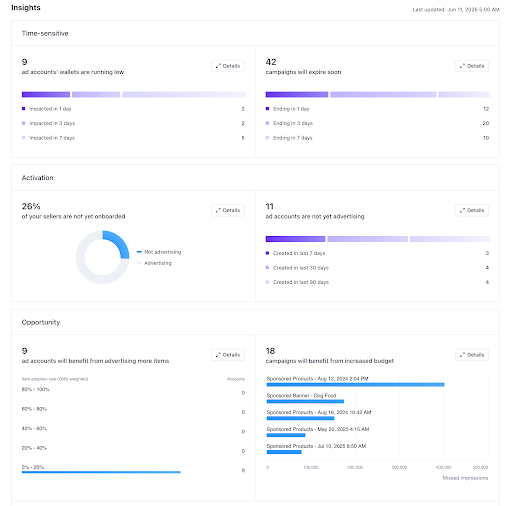
The Insights tab in Campaign Manager.
Next steps
- If you have any questions, see MCM FAQ.
Updated 4 months ago