
Demand Agent
What is it?
Demand Agent Lifecycle Triggers is a new feature that blends traditional data-driven approaches with an innovative LLM recommendation engine to proactively engage advertisers across the sales funnel. Platforms can enable the feature once, and MCM will determine the right next action for each advertiser based on their lifecycle and catalog.
Each trigger proactively activates, upsells, and revives advertisers across the sales funnel. While we recommend all three triggers be enabled together, they can each be enabled independently.
Phase 1 includes:
- Trigger 1: New Advertiser Activation. Activates new advertisers with a personalized, one-click campaign immediately available at sign up in the MCM portal, reducing time-to-value.
- Trigger 2 : Advertiser Upsell. Upsells active advertisers with an automated email when high-performing campaigns are nearing their budget limits, driving more spend.
- Trigger 3 : Churn Re-engagement. Sends churned advertisers monthly insights emails and personalized one-click campaign recommendations to reduce the barrier to return.
Prerequisites
- User Permissions: Advertisers must have Edit or Admin access within the portal. Users with "View-only" permissions will not be able to view, customize, or launch recommended campaigns.
- Minimum Data History: The platform must have at least 4 weeks of operational data post-onboarding. This is required for the AI engine to generate accurate insights and relevant recommendations for new and existing sellers.
The Lifecycle Trigger Framework
Demand Agent engages advertisers through three core automated triggers based on their real-time behavior.
| Lifecycle Stage | Primary Experience | Trigger Event | Impact |
|---|---|---|---|
| Activation | In-portal Welcome Pop-up with a one-click campaign. | New advertiser first-time login. | Increased time-to-value for new advertisers and increased campaign quality, including greater ROAS and budget utilization compared to campaigns advertisers set up on their own |
| Growth (Upsell) | Automated email with a specific suggested budget increase. | Budget utilization > x% while hitting tROAS. | An increase in budgets, directly driving GAS when the campaign is working well and hitting a ceiling. During pilots this showed between 11% - 109% budget uplift for advertisers emailed across 6 months. |
| Revival | Monthly personalized insights email with a tailored recommendation. | No live campaign activity for ≥ N days. | Higher re-activation rate for churned advertisers compared to baseline. |
Trigger 1. Activation: Welcoming New Advertisers
When a new advertiser logs into your portal for the first time, Demand Agent greets them with a personalized welcome message.
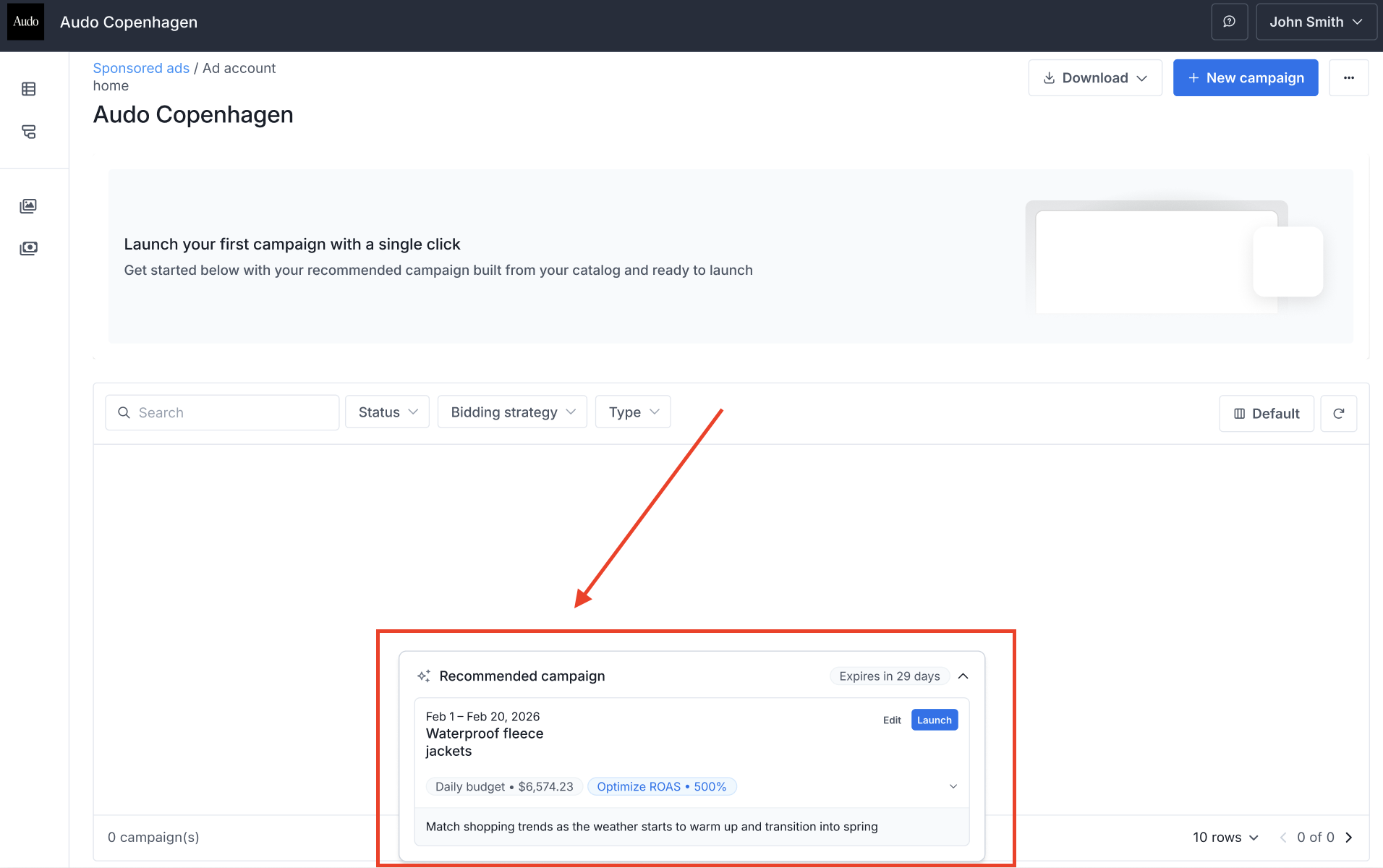
First-time advertisers see a clear call-to-action to launch their first campaign with a single click.
- Demand Agent generates the ideal first campaign for each advertiser.
- Advertisers can toggle Launch to activate immediately or click Edit to customize suggested budgets, schedules, or product selections.
Trigger 2. Growth: Upselling Active Advertisers
Demand Agent monitors active campaigns and proactively alerts advertisers via email when their success is limited by their budget.
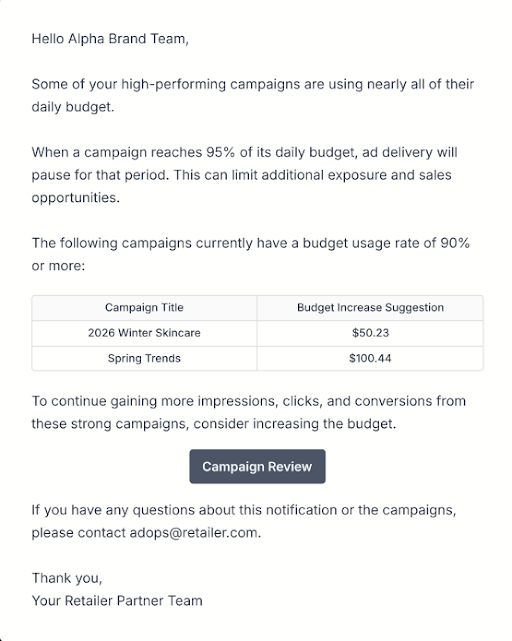
Automated email alerts notify you when high-performing campaigns are nearing their budget limits
- Logic: The trigger fires when a campaign is hitting its target ROAS (tROAS) but is close to depleting its daily or weekly budget.
- Smart Guidance: The automated email includes a specific Suggested Budget Increase amount based on item-level demand, removing guesswork for the seller.
- Suppression: Alerts are suppressed during a campaign's initial 7-day learning period to ensure data stability.
Trigger 3. Revival: Re-engaging Churned and Dormant Accounts
For advertisers who have stopped spending, Demand Agent delivers monthly, personalized insights to reduce the barrier to return.
- The Trigger: An account has signed up but has not run a campaign for 14 days ( 14 is the default, but is configurable and can be extended to 30, 60, 90, etc), or had an active campaign that stopped more than 14 days ago, or an ad account has signed up, but has not yet run their first ad account.
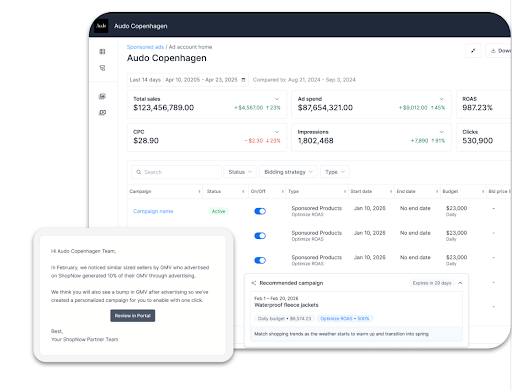
NOTEThe Email: On the first day of each month, the system sends a competitive insight email featuring top-trending platform categories.
Persistence: The system will send 3 consecutive monthly messages (default, but configurable) before capping outreach to avoid fatigue.
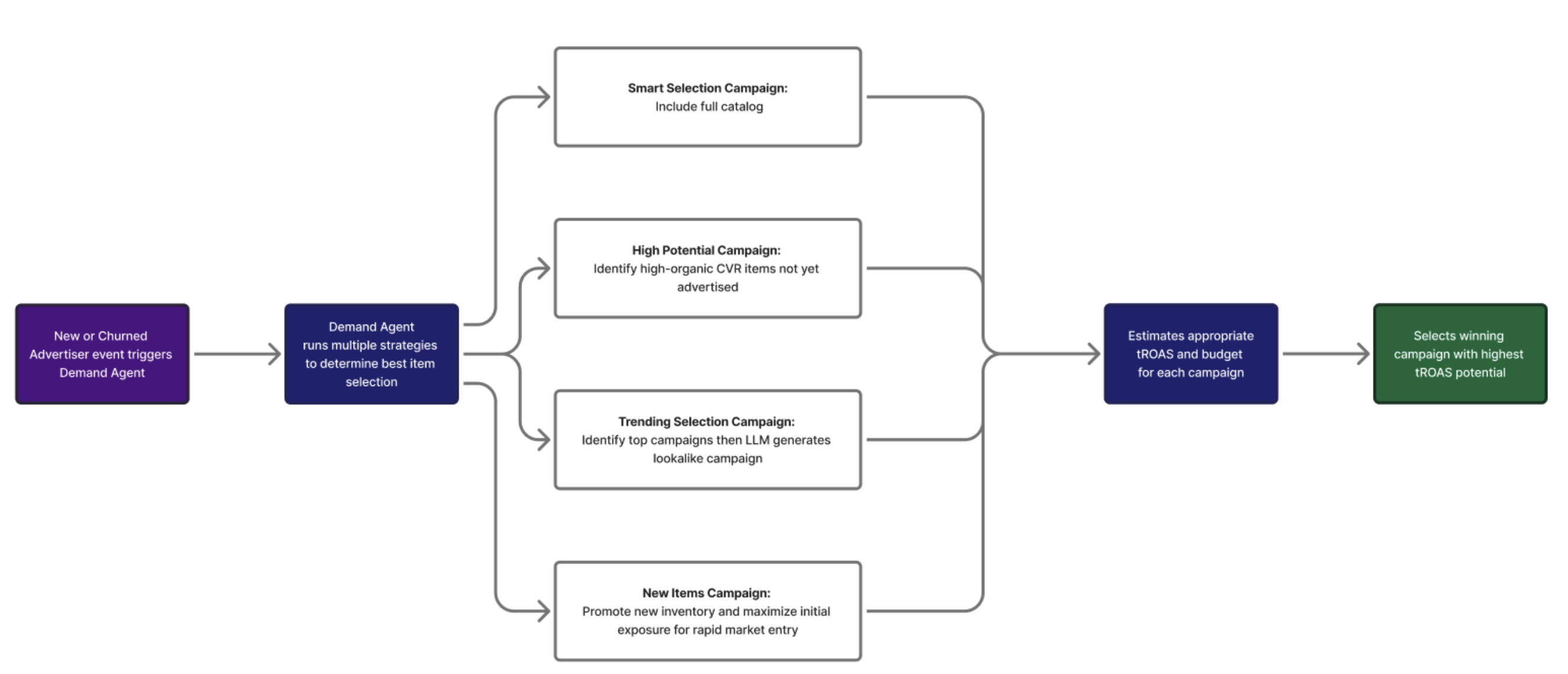
How does the campaign recommendation engine work?
When triggered, Demand Agent runs multiple recommendation strategies and pulls guidance values where available for tROAS and budget. Then, Demand Agent chooses the campaign with the highest tROAS as the winner.
Activation
To activate the Demand Agent, you need to contact your Moloco representative.
You may also share your desired business rules with the Moloco team, so that the Demand Agent serves as useful as possible.
Configurable Settings:
| Category / Trigger | Configuration Option | Recommended/Default Setting | Strategic usage |
|---|---|---|---|
| New Advertiser | Status Toggle | Enabled/Disabled | Activates the welcome pop-up with a one-click campaign recommendation for first-time sign-ups. |
| High budget utilization trigger | Status Toggle | Enabled/Disabled | Enables automated budget alerts for high-performing campaigns hitting their targets but running out of funds. |
| Active Advertiser | Notification Frequency (Days) | 7 Days | Sets how often an upsell email can be sent to a single ad account. Recommended to send weekly to maintain impact. |
| Active Advertiser | Budget Utilization (%) | 90% or 95% | The threshold at which a campaign is considered "near depletion." Triggered only if the campaign is also meeting tROAS targets. |
| Dormant Advertiser | Status Toggle | Enabled/Disabled | Dependency: Requires the "New Advertiser" trigger to be active first. Targets users who signed up but never ran their first campaign. |
| Dormant Advertiser | Days Inactive for Dormant Definition | 14 Days | The number of days after account creation and the first recommendation view without live campaign activity. |
| Dormant Advertiser | Retries | 3 | The maximum number of monthly re-engagement emails sent to a dormant advertiser before outreach is capped to avoid fatigue. |
| Churned Advertiser | Status Toggle | Enabled/Disabled | Targets previously active advertisers who have had no live campaigns for a significant period. |
| Churned Advertiser | Days Inactive for Churn Definition | 14 Days | The threshold of inactivity required to categorize an advertiser as "churned". |
| Churned Advertiser | Notification Frequency Type | Monthly (First Day) | Sends re-engagement emails monthly. Standard behavior uses platform insights from the platform's previous month. |
| Churned Advertiser | Retries | 3 | Caps the monthly re-engagement outreach at 3 attempts. Capping is reset if the advertiser becomes active and churns again later. |
Next Steps
In case you have any questions, check the FAQ.
Updated 4 months ago